
What Is an Expert Advisor (EA) in MT5?
An Expert Advisor (EA) is a program that runs inside MetaTrader and can analyse the market and place, change or close trades by itself, following rules written in advance. In everyday language it is a "trading robot" or "trading bot". In MetaTrader's own language it is an Expert Advisor, and it is written in MQL5 (MetaTrader 5) or MQL4 (MetaTrader 4).
This guide explains what an EA actually does, how it differs from the other kinds of MT5 programs, what you need to run one, and what to check before you trust one with real money.
Key takeaways
- An EA is attached to a chart and reacts to every new price (a "tick") on that symbol. It can trade automatically or only manage trades you open.
- MT5 runs four kinds of programs: Expert Advisors (can trade), indicators (draw and calculate, cannot trade), scripts (run once and stop) and services (background tasks without a chart).
- Only one EA can run on a chart at a time. To run more, open more charts.
- An EA only works while MetaTrader is open and connected, with Algo Trading switched on.
- Most EAs are plain rules, not AI. Judge any EA by its rules, its backtest and its worst drawdown.
How an EA runs
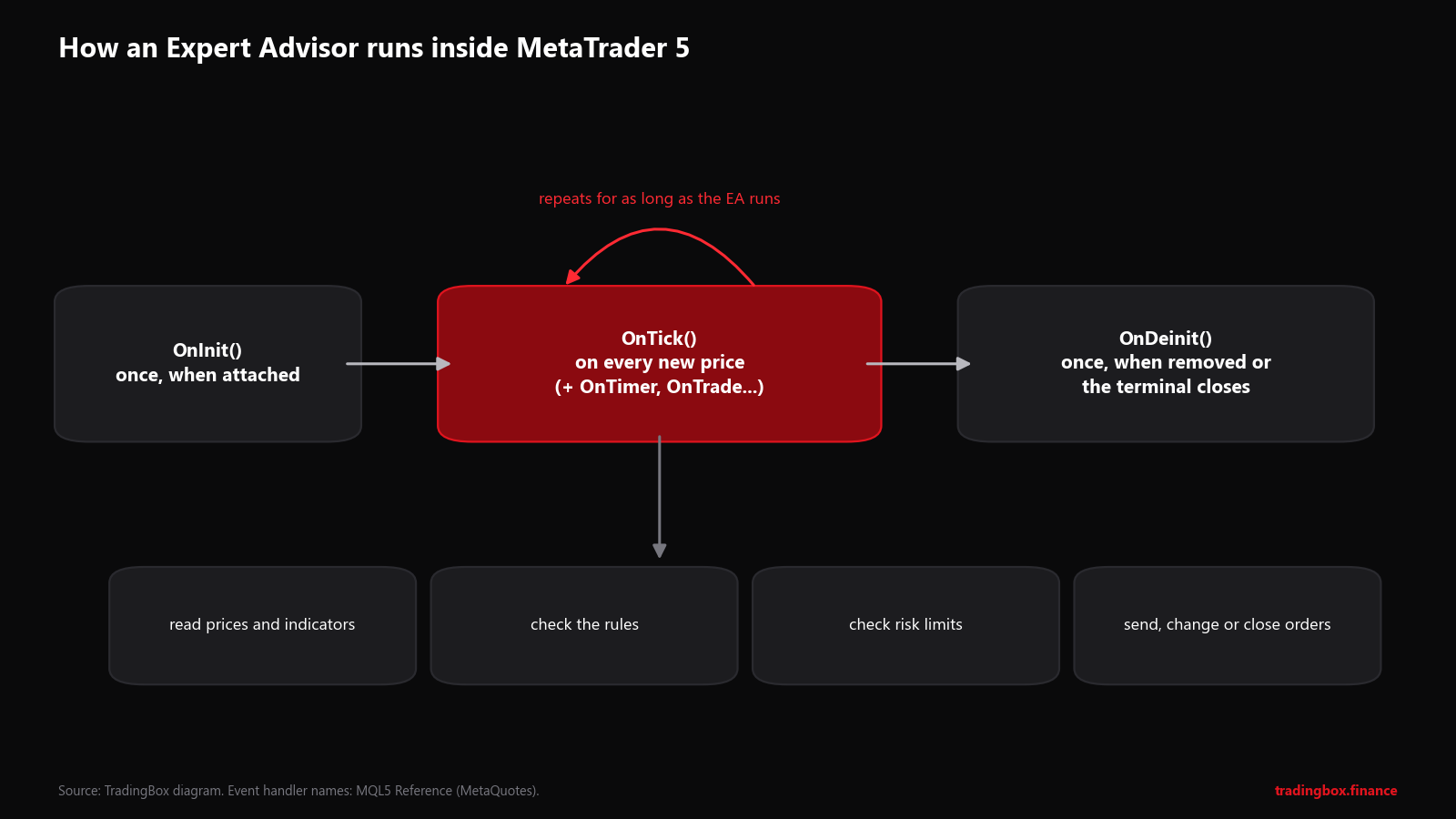
An EA is built from a few functions that MetaTrader calls at the right moment:
| Function | When MT5 calls it | Typical job |
|---|---|---|
OnInit() | Once, when the EA is attached | Check inputs, prepare indicators |
OnTick() | On every new price for the chart's symbol | Read prices, check rules, manage trades |
OnTimer() | At a fixed interval, if the EA asks for it | Time-based checks (news windows, session times) |
OnTrade() / OnTradeTransaction() | When a trade operation happens | React to fills, closes, rejections |
OnDeinit() | Once, when removed or the terminal closes | Clean up |
OnTester() | At the end of a Strategy Tester run | Report a custom score for optimisation |
On a busy symbol OnTick() can run many times a second. Each time, a typical EA reads the latest prices and indicator values, checks its entry and exit rules, checks its risk limits, and sends, modifies or closes orders if something has changed. Each EA runs in its own separate thread, so a slow EA does not freeze your charts.
EA vs indicator vs script vs service
| Expert Advisor | Indicator | Script | Service | |
|---|---|---|---|---|
| Can place trades | Yes | No | Yes | Not its usual job |
| Runs | Continuously on a chart | Continuously on a chart | Once, then stops | Continuously, no chart |
| Per chart | One | Many | One at a time | Not on a chart |
| Typical use | Automated or semi-automated trading | Signals, levels, oscillators | "Close all trades", "place a grid of orders" once | Data feeds, custom symbols |
| Where the file goes | MQL5\Experts | MQL5\Indicators | MQL5\Scripts | MQL5\Services |
You will see two file types: .mq5 is the source code (readable, editable in MetaEditor), .ex5 is the compiled program MetaTrader runs. Commercial EAs are usually sold as .ex5 only, so the code stays private.
What you need to run an EA
- MetaTrader 5 and a broker account (start with demo).
- The EA file in the
MQL5\Expertsfolder. Our guide shows every step: How to install an Expert Advisor in MT5. - Algo Trading switched on: the Algo Trading button in the toolbar must be active, and Allow Algo Trading ticked in the EA's settings when you attach it.
- A chart of the symbol and timeframe the EA was designed for.
- MetaTrader running and connected. If you close the platform or your PC sleeps, the EA stops. Many traders rent a small VPS (a virtual server that runs 24/7); MetaQuotes also offers built-in virtual hosting.
When an EA is running, a small icon in the top-right corner of the chart shows its status. Messages and errors appear in the Experts tab of the Toolbox (Ctrl+T); always check it after attaching a new EA.
What EAs are used for
- Fully automated strategies: trend following, mean reversion, breakouts. See Algorithmic Trading for Beginners.
- Trade managers: you open the trade, the EA calculates the lot size, places the stop and target, moves to break-even, trails and closes. Often the most useful EA a discretionary trader can have. See Algorithmic vs Manual Trading.
- Risk guards: close everything at a daily loss limit, block trading during news or when the spread is too wide.
- Utilities and training tools: copying trades between accounts, alerts, or replaying past charts to practise, like our MT5 Candle Replay EA.
Is an EA the same as an AI bot?
Usually not. Most EAs are rule-based: "if this, then that". Some include a machine-learning model, which MT5 can run in the ONNX format. And many "AI bots" sold online are ordinary EAs, often martingale or grid systems, with a new label. Our article AI Trading Bots vs MT5 Expert Advisors explains the difference and the red flags.
Before you trust an EA with money
- Know what kind of strategy it is. Trend, mean reversion, grid, martingale? How does it set stops and size trades?
- Backtest it yourself in the MT5 Strategy Tester on your broker's data with realistic spreads. See the MT5 Strategy Tester guide.
- Look at the worst drawdown, not the best month.
- Run it on demo for a few weeks and compare with the backtest.
- Start live small, with a maximum loss decided in advance, and keep watching the Experts tab.
Frequently asked questions
Are Expert Advisors legal? Yes. They are a standard feature of MetaTrader. A few brokers restrict particular styles (very high-frequency trading or latency arbitrage), so read your broker's terms.
Do EAs work on MT4 and MT5?
Each platform has its own language and file format. An MT4 EA (.ex4) does not run on MT5, and the other way round; it must be rewritten.
Can I run several EAs at once? Yes, one per chart. Open a chart for each EA (they can be the same symbol). Watch that their combined risk stays within your limits.
Does an EA keep trading if I close MetaTrader? No. The EA runs inside your terminal. Trades already open stay open at the broker with their stop and target, but nothing manages them until the terminal runs again. That's why traders use a VPS.
Can an EA lose money? Yes, exactly like a person can. An EA executes a strategy; it does not guarantee that the strategy works.
Next steps
- Install and test one on demo: How to install an Expert Advisor in MT5.
- Learn the platform, including EAs and the Strategy Tester, in our free MetaTrader 5 Interface course (coming soon: press Notify me).
- Want an EA built from your own rules, with risk limits, logs and alerts? See custom EA development.
Sources
- MetaQuotes, MQL5 Reference: Event handling functions and Running programs (program types, one Expert Advisor per chart, separate threads).
- MetaQuotes: ONNX models in MQL5.
This article is education, not financial advice. Automated trading carries a high risk of losing money, plus technical risks.
Trading involves risk. See the risk disclaimer.